SharePoint and M365 Projects
SharePoint CSV Migration to SQL Server
The project involved migrating CSV and Excel files from SharePoint 2013 (on-premises) to SQL Server 2016 for a retail client, mainly to support SSRS reporting. Over 200 files, updated weekly or monthly (50KB–50MB, with inconsistent headers and delimiters), were consolidated into a centralized SQL Server data warehouse. I architected the solution, selected the products and integration approach, and coordinated with DBAs, network teams, SharePoint admins, and business users. The design included a staging database for raw imports, normalized production tables for cleaned data, and audit tables for ETL logging. Built on SSIS 2016 with Visual Studio/SSDT, the pipelines automated file ingestion, validation, and transformation, reducing manual effort from 2 days to 2 hours and significantly improving data quality and standardization. The platform established a single SQL Server repository for downstream SSRS reports and analytics, with SQL Agent jobs managing scheduled execution.
- **Project:** SharePoint CSV Migration to SQL Server
- **Role:**  Data Engineer / Architect
- **Team:** 6 members (SSIS Developers, DBAs, SharePoint Admins)
-
Packages: Flat File Source reading CSV/Excel
-
Workflows:
- Foreach Loop containers for multiple files
- Data Flow tasks with conversion, validation, and cleansing
- Conditional Split to route valid and invalid records
- Script Tasks for file archiving and custom processing
-
Data Validation:
- Row count checks before/after processing
- Data type conversions
- Business rule validation using Conditional Split
- Duplicate detection and error handling
-
Configuration & Logging:
- Package configurations for different environments
- Dynamic file path variables
- Logging and notification for monitoring execution
SSIS-based ETL Solution For a Multinational Bank
Background
This project was for a leading multinational bank with its hub in Singapore and branches across Southeast Asia. The goal was to build an ETL framework to process structured XML data from the bank’s document capture platform and integrate it with their existing SQL Server systems. SSIS was chosen as the ETL tool since it was already part of the SQL Server stack and required minimal changes to security or infrastructure.
Project Details:
- Role: Solution Architect / Onsite coordinator
- Team Size: 12 members (ETL developers, database architects, business analysts, DBAs)
- Domain: Banking & Financial Services - Document Processing
- Pilot Scope: Credit Card Applications & Account Opening (with expansion roadmap)
Responsibilities In this project, I worked as a solution architect and onsite coordinator, focusing on the design and development of the ETL framework. My role covered selecting the right SQL Server–based tools, designing the core data integration approach, and building key SSIS workflows. I collaborated with business analysts to turn requirements into technical specifications, ensured data quality checks were in place, and tuned performance for high-volume processing. Alongside my own development work, I supported the offshore team by reviewing packages and providing technical guidance where needed.
Overall System Architecture:
---
config:
  look: handDrawn
  handDrawnSeed: 42
  fontFamily: Caveat
---
graph TB
    subgraph "Document Sources"
        DOC[Banking Documents<br/>Credit Cards / Accounts<br/>Paper / Digital Forms]
    end

    subgraph "Document Processing (Existing)"
        CAPTIVA[EMC Captiva<br/>Document Capture & OCR]
        XML[XML Files<br/>Network Shared Folder<br/>\\BankingData\XMLExport\]
    end

    subgraph "Microsoft ETL Platform - SQL Server 2008"
        VS[Visual Studio 2008<br/>SSIS Package Development<br/>BI Development Studio]

        subgraph "SSIS ETL Framework"
            MASTER[Master Controller<br/>SSIS Parent Package<br/>Orchestration & Scheduling]
            CC[Credit Card ETL<br/>Risk Assessment<br/>Validation Rules]
            AO[Account Opening ETL<br/>KYC Processing<br/>Compliance Checks]
        end

        SSMS[SQL Server Management Studio<br/>DB Administration<br/>Performance Monitoring]
    end

    subgraph "SQL Server 2008 Database Infrastructure"
        STAGING[(Staging Database<br/>Raw XML Import)]
        EDW[(Enterprise Data Warehouse<br/>Clean & Processed Data)]
        AUDIT[(Audit Database<br/>Process Logs & Lineage)]
    end

    subgraph "Monitoring & Reporting"
        SSRS[ETL Monitoring Dashboards<br/>Business Reports]
        ALERTS[SQL Server Agent<br/>Job Scheduling<br/>Email Alerts]
    end

    subgraph "Regional Deployment"
        SG[SG Hub<br/>Primary Processing]
        MY[MY Node<br/>Local Compliance]
        TH[TH Node<br/>Local Compliance]
        ID[ID Node<br/>Local Compliance]
        PH[PH Node<br/>Local Compliance]
    end

    DOC --> CAPTIVA
    CAPTIVA --> XML
    XML --> MASTER

    VS -.->|Develops| MASTER
    VS -.->|Develops| CC
    VS -.->|Develops| AO
    SSMS -.->|Manages| STAGING
    SSMS -.->|Manages| EDW

    MASTER --> CC
    MASTER --> AO
    CC --> STAGING
    AO --> STAGING
    STAGING --> EDW
    CC --> AUDIT
    AO --> AUDIT

    EDW --> SSRS
    AUDIT --> SSRS
    MASTER --> ALERTS

    EDW -.->|Replicates to| SG
    EDW -.->|Replicates to| MY
    EDW -.->|Replicates to| TH
    EDW -.->|Replicates to| ID
    EDW -.->|Replicates to| PH

    style VS fill:#e1f5fe
    style SSMS fill:#e1f5fe
    style SSRS fill:#e1f5fe
    style ALERTS fill:#e1f5fe
    style MASTER fill:#fff3e0
    style CC fill:#fff3e0
    style AO fill:#fff3e0
    style STAGING fill:#f3e5f5
    style EDW fill:#f3e5f5
style AUDIT fill:#f3e5f5- XML schema validation (XSD)
- Business rule checks (credit scoring, risk, compliance)
- Required field and format validation
- Reference data lookups (country codes, branch codes, products)
- Audit trail to track records end-to-end
Performance Tuning To handle large volumes, we tuned SSIS for speed:
- Ran packages in parallel where servers allowed
- Used bulk loading (OLE DB with batch commits)
- Adjusted buffer sizes and row limits for available memory
- Disabled/rebuilt indexes during heavy loads
- Reused database connections to reduce overhead
- SQL Server 2008 R2 (Database + SSIS)
- SSIS (ETL framework for XML extraction, validation, and loading)
- SQL Server Agent (job scheduling and automation)
- SQL Server Management Studio (database administration and queries)
- BIDS (SSIS package development)
- C# script tasks/components for XML parsing, schema validation, and file handling where out-of-the-box SSIS wasn’t sufficient
- File System tasks in SSIS for handling file detection/movement
- SSRS for general reports and ETL monitoring dashboards
- Windows Server 2008 (application and database servers)
- SQL Server failover clustering (Was already implemented for high availability)
SSIS-based ETL Solution Architecture – Major Oil & Gas Company
Background:
This project was for a major oil & gas company. Their existing data capture system produced XML files—mainly invoices and contracts—from multiple countries (Angola, Egypt, ANZ, Iberia, Germany). I led the development of ETLs in SSIS to extract, validate, and transform the XML, then load it into SQL Server for downstream consumers, including SAP and BI/reporting teams. SSIS was chosen because it was already in place, integrated with MSSQL and downstream systems, and required minimal changes to existing security and network setups.
Implementation Approach:
After gathering requirements, the XML schemas for invoices, contracts, and related documents were analyzed. The ETL was built in SSIS with reusable packages for parsing, validation, and staging. Custom C# libraries were used for handling complex XML structures, applying business rules, and data enrichment. A staging database managed raw data, and audit, monitoring, and alerting were implemented to track processing and handle errors. The processed data was then loaded into SQL Server for downstream systems including SAP.
Business Value:
During the initial phase, the solution automated processing of ~10k XML files per month with error handling and recovery. It provided clean, structured data for SAP and reporting teams, supported 24/7 processing with high availability. The solution was scalable, meaning additional ETLs could be added for new document types or departments.
Project Details:
- Role: Solution Architect / Lead Data Engineer
- Team: 20 members (ETL developers, data engineers, QA specialists, business analysts)
- Domain: Oil & Gas / Energy Sector
- Geographic Scope: Angola, West Africa, and regional operations
Core Data Platform:
- Microsoft SQL Server 2008 R2 Enterprise - Primary database platform and data warehouse
- SQL Server Integration Services (SSIS) 2008 - ETL orchestration and data transformation
- SQL Server Management Studio 2008 - Database administration and development
- Windows Server 2008 R2 - Application server infrastructure
Development & Integration:
- Microsoft .NET Framework 4.0 - Custom component development and business logic
- Visual Studio 2008 - Integrated development environment
- C# Programming Language - Custom ETL components and utilities
- PowerShell v2 - Automation scripting and monitoring
Supporting Technologies:
- Microsoft Excel - Business reporting and analytics dashboards
- Windows File System - Source file monitoring and archival
- SQL Server Agent - Job scheduling and workflow automation
- XML Schema Definition (XSD) - Data validation and structure enforcement
---
config:
  look: handDrawn
  handDrawnSeed: 42
  fontFamily: Caveat
---
graph TB
    subgraph "Source Systems"
        FIELD_OPS[Field Operations<br/>Angola, Africa<br/>XML Files]
        VENDORS[Vendor Systems<br/>Batch XML Files]
        LEGACY[Legacy Systems<br/>Migration/Existing Data]
    end

    subgraph "ETL Layer"
        FILE_MONITOR[File Monitor<br/>Automated Detection]
        XML_PARSE[XML Parsing & Validation]
        TRANSFORM[Transformation & Business Rules]
        STAGING[Staging DB<br/>Temporary Storage<br/>Audit Tables]
        SSIS_ENGINE[SSIS Orchestration]
    end

    subgraph "Data Platform"
        SQL_SERVER[SQL Server 2008 R2<br/>DW & ODS]
    end

    subgraph "Consumers"
        SAP[SAP Team]
        BI[BI & Reporting]
        OPS[Operations Teams]
    end

    FIELD_OPS --> FILE_MONITOR
    VENDORS --> FILE_MONITOR
    LEGACY --> FILE_MONITOR

    FILE_MONITOR --> XML_PARSE
    XML_PARSE --> TRANSFORM
    TRANSFORM --> STAGING
    STAGING --> SSIS_ENGINE
    SSIS_ENGINE --> SQL_SERVER

    SQL_SERVER --> SAP
    SQL_SERVER --> BI
    SQL_SERVER --> OPS
I was the solution architect for the project. I defined the components and recommended the tech stack, analyzed the initial technical landscape, and looked at integration challenges and user requirements. I coordinated with the SAP team, DBAs, and the network team, and then designed the SSIS solution to meet the needs of the business and downstream systems.
SharePoint 2010 Data Ingestion - SDL Tridion Netherlands (Now RWS Group) B.V.
- Client/Company: SDL Dev Labs (Now RWS Group)
- Role: Technical Engineer
- Team: 10 members (Product Team for ECM/WCM solutions)
- Domain: Web Content Management / Enterprise Content Management
- Objective:
- Design and implement data ingestion workflows from digital documents to SharePoint CMS and Tridion WCM.
- Ensure metadata extraction, content transformation, and proper publication pipeline.
- Provide technical support to customers for seamless WCM/ECM operations.
- SDL Tridion Product Suite
- SharePoint 2010 / SharePoint Designer 2010
- SQL Server 2008
- Visual Studio 2008
- C#.NET, VBA
- Developed end-to-end data ingestion workflows: digital documents → OCR-based metadata extraction → SharePoint CMS.
- Built workflows for content lifecycle: initial creation in SharePoint → editing and publication in Tridion.
- Provided ongoing technical support to customers and internal teams.
- Ensured high quality and reliability of content workflows, improving customer satisfaction.
- Received recognition for delivering excellent support and contributing to improved CSAT scores.
SharePoint 2007 – Stanardalone to 6-Server Farm Migration
Background:
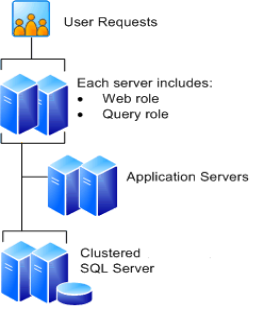
This project involved migrating a standalone SharePoint 2007 deployment to a 6-server farm for a logistics and supply chain company in Amsterdam. I designed the farm with redundancy and load balancing, set up SQL Server 2008 R2 Active/Passive failover clusters, and implemented the necessary network and load balancing infrastructure. Around 50 site collections were migrated with minimal downtime, and governance, security, and operational procedures were established.
Implementation Approach
The project involved migrating a standalone SharePoint 2007 deployment to a 6-server farm. The work started with planning and architecture design, including stakeholder workshops, analyzing the existing environment, defining growth requirements, and creating hardware and procurement plans. SQL Server 2008 R2 failover clusters were implemented with shared storage, backup, and recovery procedures, coordinating with networking and infrastructure teams. The SharePoint farm was deployed across multiple servers, with service applications distributed, F5 load balancer configured, and business requirements integrated. Site collections were migrated in phases using stsadm, with end-user validation, monitoring, and performance tracking. Operational procedures, monitoring dashboards, and alerting frameworks were established, and the production cutover was executed with infrastructure and business teams.
Project Details:
- Role: SharePoint and SQL Server Architect
- Location: Amsterdam, Netherlands (Client-side deployment)
- Team: 15+ members (infrastructure engineers, DBAs, SharePoint developers, network architects)
- Domain: Global Logistics & Supply Chain
Core Platform:
- SharePoint 2007 (MOSS) - Enterprise portal and collaboration platform
- SQL Server 2008 R2 Enterprise - Database engine with failover clustering
- Windows Server 2008 R2 - Database servers
- Windows Server 2003 R2 SP2 - SharePoint farm servers
- IIS 6.0 - Web server platform
Infrastructure & Hardware:
- F5 BIG-IP LTM - Hardware load balancer with SSL acceleration
- EMC SAN Storage - Shared storage with Fiber Channel 8Gbps
- Dell PowerEdge Servers - Enterprise server hardware
- VMware vSphere - Virtualization platform for supporting services
Development & Management:
- SharePoint Designer 2007 - Site customization and workflow design
- Visual Studio 2008 - Custom component development
- SQL Server Management Studio - Database administration
- Visual Source Safe 2005 - Source code management
6-Server Farm Overview:
---
config:
  look: handDrawn
  handDrawnSeed: 42
  fontFamily: Caveat
---
graph TB
    subgraph "Load Balancing Tier"
        F5[F5 BIG-IP Load Balancer<br/>SSL Termination<br/>Health Monitoring]
    end

    subgraph "Web Tier"
        WFE1[Web Front-End 1<br/>Windows 2003 R2<br/>IIS 6.0 + MOSS]
        WFE2[Web Front-End 2<br/>Windows 2003 R2<br/>IIS 6.0 + MOSS]
    end

    subgraph "Application Tier"
        APP1[Application Server 1<br/>Central Admin<br/>Search Services]
        APP2[Application Server 2<br/>Excel Services<br/>InfoPath Services]
    end

    subgraph "Database Tier"
        SQL_CLUSTER[SQL Server 2008 R2 Cluster<br/>Active/Passive Configuration<br/>Shared SAN Storage]
    end

    F5 --> WFE1
    F5 --> WFE2
    WFE1 --> APP1
    WFE1 --> APP2
    WFE2 --> APP1
    WFE2 --> APP2
    APP1 --> SQL_CLUSTER
    APP2 --> SQL_CLUSTER
    WFE1 --> SQL_CLUSTER
    WFE2 --> SQL_CLUSTER
SQL Server Cluster Architecture:
---
config:
  look: handDrawn
  handDrawnSeed: 42
  fontFamily: Caveat
---
graph TB
    subgraph "SQL Server Failover Cluster"
        SQL_NODE1[SQL Node 1 - Active<br/>Windows 2008 R2<br/>32GB RAM, 8-Core CPU]
        SQL_NODE2[SQL Node 2 - Passive<br/>Windows 2008 R2<br/>32GB RAM, 8-Core CPU]
        SHARED_STORAGE[EMC SAN Storage<br/>RAID 10 Configuration<br/>1.5TB Capacity<br/>Fiber Channel 8Gbps]
    end

    subgraph "Storage Layout"
        QUORUM[Quorum Disk<br/>1GB]
        SYSTEM_DB[System Databases<br/>100GB]
        CONTENT_DB[Content Databases<br/>500GB]
        LOGS[Transaction Logs<br/>200GB]
        BACKUP[Backup Storage<br/>700GB]
    end

    SQL_NODE1 -.->|Heartbeat| SQL_NODE2
    SQL_NODE1 --> SHARED_STORAGE
    SQL_NODE2 --> SHARED_STORAGE
    SHARED_STORAGE --> QUORUM
    SHARED_STORAGE --> SYSTEM_DB
    SHARED_STORAGE --> CONTENT_DB
    SHARED_STORAGE --> LOGS
    SHARED_STORAGE --> BACKUP
Network Infrastructure:
---
config:
  look: handDrawn
  handDrawnSeed: 42
  fontFamily: Caveat
---
graph TB
    subgraph "External Access"
        INTERNET[Internet Traffic]
        FIREWALL[Corporate Firewall]
    end

    subgraph "Load Balancing"
        F5_PRIMARY[F5 Primary Unit]
        F5_SECONDARY[F5 Secondary Unit]
    end

    subgraph "Network Core"
        CORE_SWITCH1[Core Switch 1<br/>Cisco Catalyst 6500]
        CORE_SWITCH2[Core Switch 2<br/>Cisco Catalyst 6500]
    end

    subgraph "VLANs"
        WEB_VLAN[Web Tier VLAN<br/>x.x.x.x/x]
        APP_VLAN[App Tier VLAN<br/>x.x.x.x/x]
        DB_VLAN[DB Tier VLAN<br/>x.x.x.x/x]
    end

    INTERNET --> FIREWALL
    FIREWALL --> F5_PRIMARY
    F5_PRIMARY -.->|Failover| F5_SECONDARY
    F5_PRIMARY --> CORE_SWITCH1
    F5_SECONDARY --> CORE_SWITCH2
    CORE_SWITCH1 -.->|Redundancy| CORE_SWITCH2
    CORE_SWITCH1 --> WEB_VLAN
    CORE_SWITCH1 --> APP_VLAN
CORE_SWITCH1 --> DB_VLAN- Designed and implemented 6-server SharePoint 2007 farm with redundancy and load balancing
- Worked with network team to configure SQL Server 2008 R2 Active/Passive failover cluster with shared SAN storage
- Worked with network team to set up F5 BIG-IP load balancer for SSL termination and health monitoring
- Planned and executed migration of 50+ site collections from standalone to farm environment
- Established governance, security policies, and operational procedures for farm management
- Coordinated with network, infrastructure, and DBA teams for seamless integration
- Provided post-migration support and optimization to ensure performance and reliability
- Conducted knowledge transfer sessions for internal IT teams on farm administration
- Successfully migrated 50+ site collections with minimal downtime (<4 hours)
- Achieved 99.9% uptime through farm architecture and failover mechanisms
- Improved page load times by 30% through optimized SQL queries and indexing
- Received client commendation for seamless migration and effective knowledge transfer
SharePoint 2007 – Publishing Portal Content Transformation
Background:
For a major Insurance provider, legacy intranet content was hosted on static HTML/ASP sites and dispersed repositories, resulting in:
- Manual content updates
- Limited search capabilities
- No multilingual support
- Decentralized document and asset management
The client wanted to migrate to Microsoft Office SharePoint Server (MOSS) 2007 Publishing Portal to establish centralized content storage, structured publishing, multilingual support, and enterprise search capabilities.
Project Details:
- Role: Senior Software Engineer
- Team Size: 10 members (developers, designers, IT administrators)
- Domain: Insurance Industry
Solution Overview:
---
config:
  look: handDrawn
  handDrawnSeed: 42
  fontFamily: Caveat
---
graph TB
    subgraph "Legacy Systems"
        LegacyHTML[Static HTML/ASP Sites]
        LegacyDocs[Dispersed Document Repositories]
        LegacyAssets[Scattered Digital Assets]
    end

    subgraph "Migration Process"
        Analysis[Content Analysis & Transformation]
        Cleanup[HTML Cleanup & Standardization]
        Migration[Content Migration & Metadata Preservation]
    end

    subgraph "MOSS 2007 Solution"
        Portal[SharePoint Publishing Portal]
        Search[Enterprise Search]
        Multilingual[Variations for Multilingual Support]
        Forms[InfoPath Forms Integration]
    end

    LegacyHTML --> Analysis
    LegacyDocs --> Analysis
    LegacyAssets --> Analysis

    Analysis --> Cleanup
    Cleanup --> Migration
    Migration --> Portal
    Portal --> Search
    Portal --> Multilingual
    Portal --> Forms
Core Platform:
- Microsoft Office SharePoint Server (MOSS) 2007 - Publishing Portal, Variations, Page Libraries, Picture Libraries, Document Libraries, Lists
- SQL Server 2005 Service Pack 3 - Active-Passive Cluster configuration
- Windows Server 2003 Service Pack 2 - SharePoint Farm deployment
- Internet Information Services (IIS) 6.0 - Web server platform
Development & Design Tools:
- SharePoint Designer 2007 - Master pages, page layouts, workflows
- Visual Studio 2005 Service Pack 1 - Custom development (C# .NET, HTML, CSS, jQuery)
- SQL Server Management Studio 2005 - Database administration
- Adobe Photoshop CS3 - Graphics and UI design
- InfoPath 2007 - Forms design and integration
SharePoint Farm Architecture:
---
config:
  look: handDrawn
  handDrawnSeed: 42
  fontFamily: Caveat
---
graph TB
    subgraph "Load Balancing Layer"
        LB[Load Balancer]
    end

    subgraph "Web Front-End Tier"
        WFE1[WFE Server 1<br/>Windows Server 2003 SP2<br/>IIS 6.0<br/>MOSS 2007]
        WFE2[WFE Server 2<br/>Windows Server 2003 SP2<br/>IIS 6.0<br/>MOSS 2007]
    end

    subgraph "Application Tier"
        APP[Application Server<br/>Windows Server 2003 SP2<br/>MOSS 2007<br/>SharePoint Services]
    end

    subgraph "Database Tier"
        SQLActive[(SQL Server 2005 SP3<br/>Active Node<br/>Content Databases)]
        SQLPassive[(SQL Server 2005 SP3<br/>Passive Node<br/>Failover Cluster)]
    end

    subgraph "Client Access"
        Users[End Users<br/>IE 7]
        Admins[SharePoint Admins<br/>Central Administration]
    end

    Users --> LB
    Admins --> LB
    LB --> WFE1
    LB --> WFE2

    WFE1 -.->|Service Calls| APP
    WFE2 -.->|Service Calls| APP
    APP -.->|Service Applications| WFE1
    APP -.->|Service Applications| WFE2

    WFE1 -->|Content DB Access| SQLActive
    WFE2 -->|Content DB Access| SQLActive
    APP -->|Config/Admin DB| SQLActive

    SQLActive -.->|Cluster Failover| SQLPassive
    SQLPassive -.->|Cluster Failover| SQLActive
Content Migration Flow:
---
config:
  look: handDrawn
  handDrawnSeed: 42
  fontFamily: Caveat
---
graph LR
    subgraph "Legacy Content Sources"
        HTML[Static HTML Pages<br/>ASP Classic Sites]
        Docs[Document Repositories<br/>File Shares<br/>Legacy Systems]
        Images[Image Assets<br/>Media Files]
        Lists[Events, Links, FAQs<br/>Static Lists]
    end

    subgraph "Transformation Process"
        Extract[Content Extraction<br/>& Analysis]
        Transform[HTML Cleanup<br/>UTF Compliance<br/>Link Preservation]
        Validate[Content Validation<br/>Metadata Mapping]
    end

    subgraph "SharePoint Content Types"
        PageLib[Page Libraries<br/>Publishing Pages<br/>Master Pages & Layouts]
        DocLib[Document Libraries<br/>Version Control<br/>Metadata]
        PicLib[Picture Libraries<br/>Image References<br/>Alt Text]
        SPLists[SharePoint Lists<br/>Custom Columns<br/>Views]
    end

    HTML --> Extract
    Docs --> Extract
    Images --> Extract
    Lists --> Extract

    Extract --> Transform
    Transform --> Validate

    Validate --> PageLib
    Validate --> DocLib
    Validate --> PicLib
    Validate --> SPLists
As one of the core members of a small SharePoint team, I contributed across all phases of the implementation, working closely with infra, application, and network teams to deliver the solution.
Phase 1: Infrastructure Setup We configured a SQL Server 2005 SP3 Active-Passive cluster with shared storage for high availability, created content and configuration databases, and deployed a SharePoint 2007 farm with WFE and application servers. IIS 6.0 was configured and integrated with Active Directory for authentication, and load balancing was established in collaboration with the network team to ensure resilience and uptime.
Phase 2: Content Analysis & Migration I was actively involved in content transformation analysis, covering UTF compliance, HTML cleanup, link preservation, and metadata standardization. Our team developed migration strategies for different content types, moving HTML/ASP pages into publishing page libraries, images into picture libraries, documents into document libraries (with metadata intact), and restructuring events, links, and FAQs into SharePoint lists. These efforts streamlined management of previously scattered content and improved accessibility for end users.
Phase 3: Customization & Development On the customization side, I contributed to creating master pages and page layouts with SharePoint Designer, applying CSS styling and jQuery enhancements, and implementing branding elements. We also integrated InfoPath 2007 forms with workflows, enabled multilingual publishing through SharePoint Variations, and configured enterprise search with custom scopes and result types to enhance discoverability.
Phase 4: Support & Adoption To support long-term use, I helped document farm topology, migration procedures, and custom development work, as well as prepare deployment scripts and automation tools. I also provided operational support, trained content managers on publishing workflows, and worked on governance and maintenance procedures. These activities reduced content update times from hours to minutes, shortened approval cycles, and improved overall discoverability, contributing to smoother adoption across the business.
WSS 3.0 – Migration of Network Documents to SharePoint
- Project: Document Migration from Network Drives to SharePoint WSS 3.0
- Role: Software Engineer
- Team: 1 Project Manager + 3 Developers
- Domain: Financial Services / Banking
- Objective:
- Migrate documents from network drives into SharePoint WSS 3.0.
- Preserve key metadata (creation date, modification date, author) during migration.
- Build a custom migration utility in C# to accelerate uploads.
- Upgrade WSS 3.0 to SP2 as a prerequisite for future migration to MOSS 2007.
- SharePoint WSS 3.0 / SP2
- Windows Server 2003 + IIS 6
- Visual Studio 2005 (C#)
- SQL Server 2005
- Developed a custom C# migration tool to upload documents into WSS 3.0.
- Collaborated with users during the migration process, resolving errors and enhancing the tool based on feedback.
- Ensured document metadata integrity (author, creation date, modification date) during migration.
- Supported manual pre-sorting of documents to improve migration efficiency.
- Upgraded SharePoint WSS 3.0 to SP2 in preparation for transition to MOSS 2007.