Useful Databricks Magic Commands
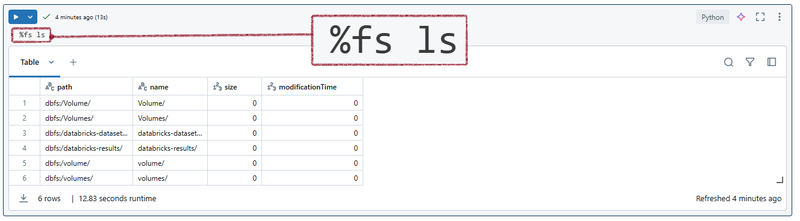
Some frequently used magic commands in Databricks
| Magic Command | Description | Example |
|---|---|---|
| %run | Runs a Python file or a notebook. | %run ./path/to/notebook |
| %sh | Executes shell commands on the cluster nodes. | %sh ls /dbfs |
| %fs | Interacts with the Databricks file system. | %fs ls /mnt/data |
| %sql | Runs SQL queries. | %sql SELECT * FROM table_name |
| %scala | Switches the notebook context to Scala. | %scala val x = 10 |
| %python | Switches the notebook context to Python. | %python print("Hello, Databricks!") |
| %md | Writes markdown text. | %md # This is a Markdown Header |
| %r | Switches the notebook context to R. | %r summary(data_frame) |
| %lsmagic | Lists all the available magic commands. | %lsmagic |
| %jobs | Lists all the running jobs. | %jobs |
| %config | Sets configuration options for the notebook. | %config notebook.display.max_rows=1000 |
| %reload | Reloads the contents of a module. | %reload module_name |
| %pip | Installs Python packages. | %pip install pandas |
| %load | Loads the contents of a file into a cell. | %load ./path/to/file.py |
| %matplotlib | Sets up the matplotlib backend. | %matplotlib inline |
| %who | Lists all the variables in the current scope. | %who |
| %env | Sets environment variables. | %env MY_VARIABLE=my_value |
Mounting and Unmounting Storage
| Command | Example |
|---|---|
| Mount ADLS | dbutils.fs.mount( source = "adl:// mount_point = "/mnt/ extra_configs = { "dfs.adls.oauth2.access.token.provider.type": "ClientCredential", "dfs.adls.oauth2.client.id": dbutils.secrets.get(scope = " "dfs.adls.oauth2.credential": dbutils.secrets.get(scope = " "dfs.adls.oauth2.refresh.url": "https://login.microsoftonline.com/ ) |
| Unmount Storage | dbutils.fs.unmount("/mnt/ |
| List Mount Points | display(dbutils.fs.mounts()) |
File Operations
| Command | Example |
|---|---|
| Read CSV File | df = spark.read.csv("/mnt/ display(df) |
| Write CSV File | df.write.mode("overwrite").csv("/mnt/ |
| List Files | display(dbutils.fs.ls("/mnt/ |
Secret Management
| Command | Example |
|---|---|
| Set a Secret | databricks secrets create-scope --scope databricks secrets put --scope |
| Get a Secret | secret = dbutils.secrets.get(scope = " |
Shell Commands
| Command | Example |
|---|---|
| Run Shell Command | %sh ls -lh /dbfs/mnt/ |
SQL and Context Switching
| Command | Example |
|---|---|
| Run SQL Query | %sql SELECT * FROM table_name WHERE column = 'value' |
| Switch to Scala | %scala val x = 10 |
| Switch to Python | %python print("Hello, Databricks!") |
| Switch to R | %r summary(data_frame) |
Package Management
| Command | Example |
|---|---|
| Install Packages | %pip install pandas matplotlib |
Environment and Module Management
| Command | Example |
|---|---|
| Set Environment Variable | %env MY_VARIABLE=my_value |
| Load Python File | %load ./scripts/helper.py |
| Reload Module | %reload my_module |
Variable and Configuration Management
| Command | Example |
|---|---|
| List Variables | %who |
| Notebook Configuration | %config notebook.display.max_rows=1000 |
Markdown and Plotting
| Command | Example |
|---|---|
| Write Markdown | %md # This is a Markdown Header Here is some detailed description. |
| Setup Matplotlib | %matplotlib inline import matplotlib.pyplot as plt plt.plot([1, 2, 3], [4, 5, 6]) plt.show() |
Job Management
| Command | Example |
|---|---|
| List Running Jobs | %jobs |