Data Engineering Projects
Data & ETL Migration to Azure Government Commercial Cloud (GCC)
Currently I work as a Senior Manager / Data Engineer at IRAS (Inland Revenue Authority of Singapore), Ministry of Finance, Singapore. My day-to-day works involves migrating data from on-prem SQL Server to Azure Synapse Analytics (Dedicated & Serverless) using Azure Data Factory and PySpark (Synapse Spark Pool). I also rewrite legacy SAS SQL scripts into PySpark for Synapse Spark Pool. Additionally, I am migrating 120+ Hadoop/Hive ETL workflows to Synapse Serverless with ADLS. I collaborate with Data Scientists and ML Engineers on data preparation and integration tasks.
- Project: Data and ETL Migration from On-Prem to Azure Government Commercial Cloud (GCC)
- Role: Senior Manager / Data Engineer
- Team: 20+ members across Data Engineering, Digital Infrastructure, Data Science, and AI
- Objective:
- Migrate on-prem SQL tables to Synapse Analytics (Serverless Delta Lake tables and Dedicated Pool) using Azure Data Factory and PySpark (Synapse Spark Pool).
- Rewrite SAS SQL scripts into PySpark for Synapse Spark Pool.
- Transition Hadoop/Hive ETL workflows to Synapse Serverless with ADLS.
- Collaborate with Data Scientists and ML Engineers on data preparation and integration tasks.
- Azure Government Commercial Cloud (GCC)
- Azure Data Factory
- Synapse Analytics (Dedicated & Serverless)
- ADLS
- PySpark / Synapse Spark Pool
- Hadoop / Hive
- Azure DevOps
- GitHub Copilot
- MLflow / Kedro
- Migrated data from on-prem SQL tables to Azure Synapse (Dedicated & Serverless) using ADF and PySpark.
- (In-progress)Migrating 120+ Hadoop/Hive ETL workflows to Synapse-ADLS.
- (In-progress)Converting legacy SAS SQL scripts into PySpark for Synapse Spark Pool.
- Provided technical guidance on PySpark Script optimization and best practices.
- Worked with Data Scientists to refine datasets for model development.
- Provided CI/CD pipeline guidance using Azure DevOps.
- Conducted PoC comparing Kedro and MLflow for MLOps.
- Supported user access and security in Azure GCC.
- Worked with other government agency teams to onboard GitHub Copilot and worked with vendors to resolve security issues.
Gen-AI Chatbot Prototype for a Retail Company
- Role: Assistant Manager / Data Engineer
Problem IKEA partnered with Sprinklr to build a GenAI assistant for their retail website. My role was to coordinate requirements, design the architecture, and provide technical guidance. The main challenge was bridging IKEA’s complex multi-country API ecosystem (Singapore, Malaysia, Philippines, Thailand, Mexico) with Sprinklr’s chatbot requirements. The chatbot needed to understand queries like “show me white wardrobes under $500” and translate them into specific API calls with correct filters and category mappings.
Solution I developed a FastAPI-based chatbot prototype that integrates directly with IKEA’s live APIs. The system uses a multi-agent approach: GPT-3.5 first analyzes user intent (product vs. store info), extracts details (category, store, filters), and a second LLM pass formats API responses into conversational replies. The prototype maintains indexed mappings of product categories and store locations, dynamically processes filters (color, material, price), and demonstrates every integration point for stakeholders. It ran locally and handled live queries against IKEA’s production APIs.
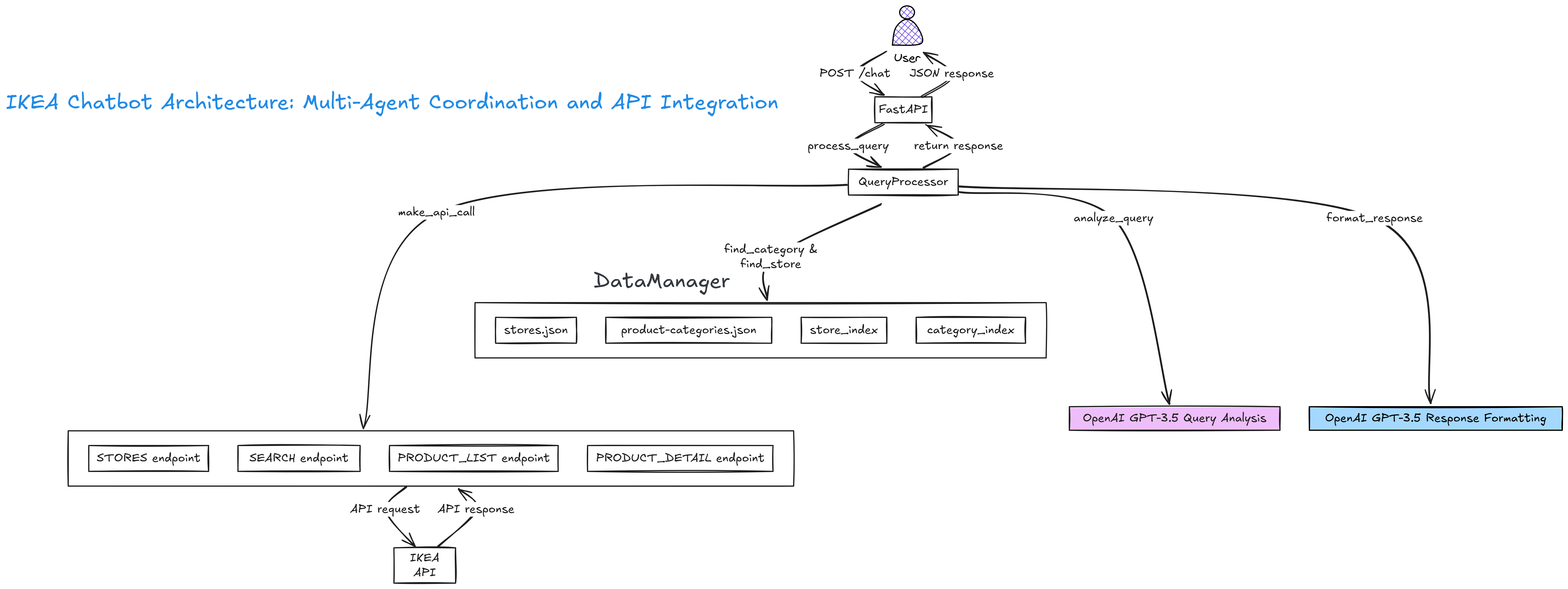
Results
The prototype showed that a GenAI chatbot could be built directly on top of IKEA’s APIs. It gave a clear architecture for Sprinklr to use. Before this, there was confusion on how to handle filters, categories, and store logic. The prototype removed that uncertainty and showed what users wanted and what Sprinklr was offering. With just the APIs and GPT-3.5, we built a working chatbot, and the project picked up momentum after that.
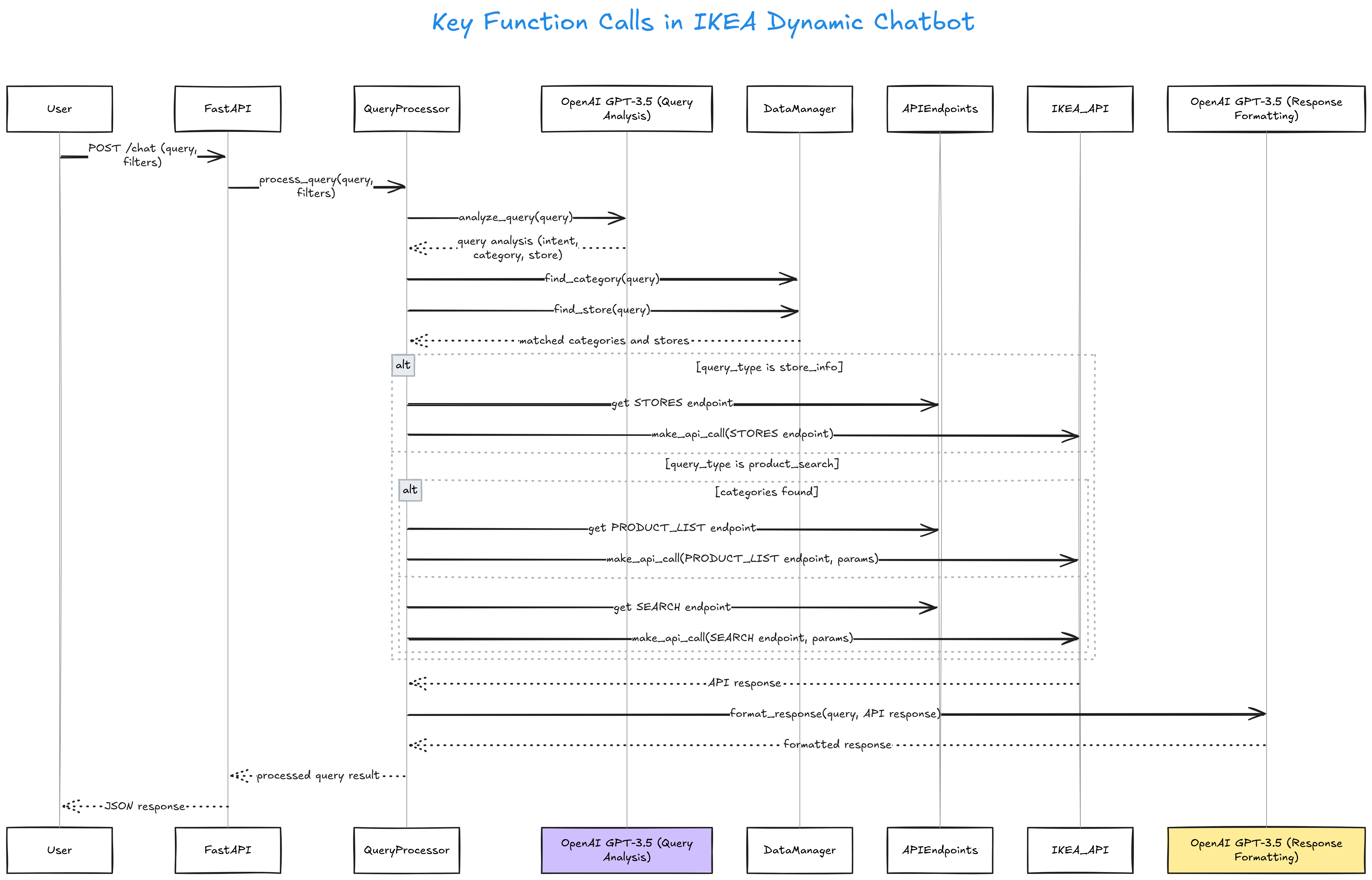
# FastAPI-based IKEA Gen-AI Chatbot Prototype (Dec 2024)
# Handles queries like: "Show me white wardrobes", with dynamic filters and API integration

import os, json, logging
from typing import Dict, List, Optional, Any
from fastapi import FastAPI, HTTPException
from pydantic import BaseModel
import httpx
from openai import OpenAI
from dotenv import load_dotenv

logging.basicConfig(level=logging.INFO)
logger = logging.getLogger(__name__)

load_dotenv()
app = FastAPI()

MARKET = os.getenv("MARKET", "sg")
LANGUAGE = os.getenv("LANGUAGE", "en")
CLIENT_ID = os.getenv("CLIENT_ID", "aiseaapp")
VERSION = os.getenv("VERSION", "20240110")

class APIEndpoints:
    def __init__(self, market, language):
        self.STORES = f'https://www.ikea.com/{market}/{language}/meta-data/navigation/stores.json'
        self.SEARCH = f'https://sik.search.blue.cdtapps.com/{market}/{language}/search-result-page'
        self.PRODUCT_LIST = f'https://sik.search.blue.cdtapps.com/{market}/{language}/product-list-page'

class DataManager:
    def __init__(self):
        self.stores = self._load_json('stores.json')
        self.categories = self._load_json('product-categories.json')
        self.store_index = self._index_stores()
        self.category_index = self._index_categories()

    def _load_json(self, filename):
        try:
            with open(filename, 'r') as f:
                return json.load(f)
        except Exception:
            return {}

    def _index_stores(self):
        return {store['displayName'].lower(): {'id': store['id']} for store in self.stores}

    def _index_categories(self):
        return {cat['title'].lower(): {'id': cat['id']} for cat in self.categories}

    def find_category(self, query):
        query_terms = query.lower().split()
        return [{"id": data["id"], "title": name} for name, data in self.category_index.items()
                if all(term in name for term in query_terms)]

    def find_store(self, query):
        return [{"id": data["id"], "name": name}
                for name, data in self.store_index.items()
                if any(term in name for term in query.lower().split())]

class QueryProcessor:
    def __init__(self, api_key):
        self.client = OpenAI(api_key=api_key)
        self.data_manager = DataManager()
        self.api_endpoints = APIEndpoints(MARKET, LANGUAGE)

    def analyze_query(self, query):
        try:
            response = self.client.chat.completions.create(
                model="gpt-3.5-turbo",
                messages=[
                    {"role": "system", "content": "Analyze IKEA query and extract query_type, category, store, requirements as JSON."},
                    {"role": "user", "content": query}
                ]
            )
            return json.loads(response.choices[0].message.content)
        except Exception:
            return {}

    async def make_api_call(self, endpoint, params=None):
        base_params = {'c': CLIENT_ID, 'v': VERSION}
        if params:
            filters = params.pop('filters', {}) if 'filters' in params else {}
            base_params.update(filters)
            base_params.update(params)
        async with httpx.AsyncClient() as client:
            response = await client.get(endpoint, params=base_params)
            response.raise_for_status()
            return response.json()

    async def process_query(self, query, filters=None):
        analysis = self.analyze_query(query)
        categories = self.data_manager.find_category(query)
        stores = self.data_manager.find_store(query)
        params = {}
        if filters:
            params['filters'] = filters
        api_responses = []
        if analysis.get('query_type') == 'store_info':
            api_responses.append(await self.make_api_call(self.api_endpoints.STORES))
        elif analysis.get('query_type') == 'product_search':
            if categories:
                for category in categories:
                    search_params = {'category': category['id'], 'store': stores[0]['id'] if stores else '022', **params}
                    api_responses.append(await self.make_api_call(self.api_endpoints.PRODUCT_LIST, search_params))
            else:
                search_params = {'q': query, 'types': 'PRODUCT', **params}
                api_responses.append(await self.make_api_call(self.api_endpoints.SEARCH, search_params))
        formatted_response = "I apologize, but I couldn't retrieve the information you requested."
        if api_responses:
            try:
                response = self.client.chat.completions.create(
                    model="gpt-3.5-turbo",
                    messages=[
                        {"role": "system", "content": "Format IKEA data into helpful response."},
                        {"role": "user", "content": f"Query: {query}\nData: {json.dumps(api_responses)}"}
                    ]
                )
                formatted_response = response.choices[0].message.content
            except Exception:
                pass
        return {'query': query, 'analysis': analysis, 'response': formatted_response}

class ChatRequest(BaseModel):
    query: str
    filters: Optional[Dict[str, Any]] = None

@app.post("/chat")
async def chat(request: ChatRequest):
    query = request.query
    filters = request.filters
    if not query:
        raise HTTPException(status_code=400, detail="No query provided")
    processor = QueryProcessor(os.getenv('OPENAI_API_KEY'))
    return await processor.process_query(query, filters)

if __name__ == '__main__':
    import uvicorn
    uvicorn.run(app, host='127.0.0.1', port=5000)
CI/CD Pipeline for Databricks Git Synchronization for IKANO Retail
IKANO retail data platform runs on Azure with Databricks, ADF, DBT, and Power BI. The platform processes data across 5 countries (SG, MY, PH, TH, MX) with master pipelines running twice daily, orchestrating 50+ Databricks jobs.
Issue:
Databricks Git integration doesn't automatically sync when code is pushed to Azure DevOps. Developers had to manually pull changes in Databricks after every commit. Authentication tokens expired periodically, breaking deployments silently. This manual process was unreliable for a platform processing critical daily data flows.
Solution: I designed an Azure DevOps pipeline that triggers on commits to the main branch. The pipeline uses the Databricks CLI to authenticate via service principal, update Git credentials with a fresh token, and sync the Databricks repo to the latest commit. This automated approach ensures Databricks always has the latest code without manual intervention.
Pipeline Config
trigger:
- ar_iac_databricks

jobs:
- job: 'dbt_code_deploy'
displayName: 'Deploy code on Databricks repos'
timeoutInMinutes: 10
pool:
    vmImage: ubuntu-latest

variables:
- group: azure-env-prod
- name: databricks_git_credentials_id
    value: 'xxx'
- name: databricks_repository_id
    value: 'xxx'
- name: branch_name
    value: 'ar_iac_databricks'
Auth & Sync Steps
steps:
- script: sudo apt update && sudo apt install curl jq -y
displayName: 'Install tools'

- script: curl -fsSL https://raw.githubusercontent.com/databricks/setup-cli/main/install.sh | sh
displayName: 'Install databricks-cli'

- script: |
    echo '[databricks-profile]' >> ~/.databrickscfg
    echo "host=$(DATABRICKS_PROD_URL)" >> ~/.databrickscfg
    echo "azure_tenant_id=$(AZURE_TENANT_ID)" >> ~/.databrickscfg
    echo "azure_client_id=$(AZURE_CLIENT_ID)" >> ~/.databrickscfg
    echo "azure_client_secret=$AZURE_CLIENT_SECRET" >> ~/.databrickscfg
env:
    AZURE_CLIENT_SECRET: $(AZURE_CLIENT_SECRET)
displayName: 'Setup databricks config'

- script: |
    curl -X POST -H 'Content-Type: application/x-www-form-urlencoded' \
    https://login.microsoftonline.com/$(AZURE_TENANT_ID)/oauth2/v2.0/token \
    -d client_id=$(AZURE_CLIENT_ID) \
    -d grant_type=client_credentials \
    -d scope=xxx/.default \
    -d client_secret=$AZURE_CLIENT_SECRET | jq '.access_token' -r > ~/.ado_token
displayName: 'Get fresh token'

- script: |
    databricks git-credentials update \
    $(databricks_git_credentials_id) \
    "AzureDevOpsServices" \
    --personal-access-token "$(cat ~/.ado_token)" \
    --profile databricks-profile
displayName: 'Update git credentials'

- script: |
    databricks repos update \
    $(databricks_repository_id) \
    --branch $(branch_name) \
    --profile databricks-profile
displayName: 'Sync repository'
Databricks, DBT, ADF and Gen-AI Solutions for a Retail Company
- Project: Databricks, DBT, ADF and Gen-AI Solutions for IKANO Retail
-
Role: Assistant Manager / Data Engineer
Background:
The platform was built on Azure, Databricks, ADF (for orchestration), DBT (for SQL-based transformations), and Power BI (for reporting). It ingested data from multiple sources including Dynamics MVBC, Dynamics MVCRM, SQL Server, SharePoint, Google BigQuery, and Yotpo.
Data ingestion was done using Databricks Autoloader with transformations handled in Databricks + DBT. Two master ADF pipelines ran twice daily (SEA and Mexico), each orchestrating 50+ Databricks jobs and running for 5+ hours.
The setup processed sales orders, CRM data, product and pricing references, POS transactions, inventory, promotions, and ad-hoc SharePoint extracts, enabling country-specific reporting and cross-market insights. Dedicated ingestion jobs per country (SG, MY, PH, TH, MX) applied local rules and formats but were centrally orchestrated by ADF and Databricks.
Master Pipeline:
- Central orchestrator for 50+ Databricks jobs across SEA and Mexico
- Runs twice daily, handling ingestion, transformation, parameter passing, logging, and error handling
- Integrates data from MVBC, MVCRM, Yotpo, web analytics, food outlets, and SharePoint
- Outputs transformed data into DBT models that build analytics-ready (gold) tables for reporting and dashboards
Responsibilities:
- BAU support and monitoring of ADF + Databricks + DBT pipelines
- Day-to-day Azure/Databricks administration
- Optimize ADF and Databricks workflows to reduce Azure costs
- Plan migration of Hive-based workloads into Databricks Unity Catalog
- Build an internal knowledge platform for documentation and learning
- Azure (ADLS, ADF, Azure DevOps, ARM Templates)
- Databricks (Repos, Delta Lake, Autoloader, Unity Catalog)
- DBT (SQL/ELT transformations)
- Power BI
- Dynamics MVCRM / MVBC
- SharePoint
- Google BigQuery
- REST APIs (Ikano, Dynamics, internal systems)
- Weaviate (Vector Database)
- LangChain
- GPT-3.5 / GitHub Copilot
- Terraform & ARM Templates (infra automation, evaluation)
- GitHub-Jekyll / MkDocs / GitBook (knowledge platform, evaluation)
Azure Databricks Migration for ML Data Preparation – Environmental Research Lab
- Project: Water Quality Data Migration from SharePoint to Azure
- Role: Data Engineer
- Duration: Jan 2024 – Sep 2024
- Team: 5 members (Data Engineer, Lab Technician, Azure Admin, Environmental Scientist, Data Analyst)
- Domain: Environmental Research – Water Purification
Overview:
Migrated water quality testing data to Azure Data Lake and set up Databricks pipelines for cleaning and preparing ML-ready datasets. Supported predictive modeling of water treatment effectiveness.
-
Migration:
- Copied 12,000+ CSV/Excel files (450GB) from SharePoint to Azure Data Lake using Azure Data Factory pipelines
- Verified file integrity and organized folders using Python scripts
-
Databricks Processing:
- Ingested new CSV files with Auto Loader
- Cleaned and standardized key measurements (pH, turbidity, dissolved oxygen, contaminants) using PySpark/DataFrame transformations
- Performed basic data quality checks (range validation, missing values)
- Aggregated data for ML and reporting
-
Job Scheduling:
- Daily Databricks jobs using Workflows
- Basic alerts on failures via email/Slack
- Reduced data preparation from 2–3 weeks to 2 days
- Standardized units and flagged data errors
- Enabled trend analysis and ML model development for water treatment
| Component | Technology |
|---|---|
| Source | SharePoint / Lab CSV files |
| Migration | Azure Data Factory, Python scripts |
| Storage | Azure Data Lake Storage Gen2 |
| Processing | Azure Databricks (Auto Loader, PySpark) |
| Format | Delta Lake |
| Orchestration | Databricks Workflows |
- Variations in CSV formats → simple parsing and schema adjustments
- Missing/incorrect values → validation and cleaning steps
- Network drive connectivity → retry logic and batch transfers
Azure Databricks Migration for ML Data Preparation – Biotech Research Lab
- Project: Lab Data Migration from SharePoint to Azure
- Role: Data Engineer
- Team: 4 members (Data Engineer, Azure Admin, Lab Manager, Data Scientist)
- Domain: Biotech Research Lab
Overview:
Migrated 3 years of lab data from SharePoint to Azure Data Lake and set up Databricks pipelines for data cleaning, standardization, and ML-ready dataset preparation. Enabled faster data access and ML model development.
- Migration:
- Azure Data Factory pipelines to transfer 8,000+ Excel/CSV files (750GB)
- Python scripts for validation, integrity checks, and folder organization
-
Data Processing:
- Databricks notebooks for format standardization, missing/outlier handling
- Compound ID mapping, aggregation, and feature engineering for ML
- Generated data quality reports and visual checks
-
ML Output:
- Compound screening: 45,000 records
- Protein binding: 12,000 measurements
- Cell viability: 38,000 data points
- Combined feature matrix for multi-target prediction
- Reduced data prep time from weeks to hours
- Resolved 2,300+ duplicate records and standardized units
- Filled ~15% missing data via interpolation
- Delivered first ML prototype 2 months ahead of schedule
| Component | Technology |
|---|---|
| Source | SharePoint 2016 |
| Migration | Azure Data Factory |
| Storage | Azure Data Lake Storage Gen2 |
| Processing | Azure Databricks (Python) |
| Development | Jupyter notebooks, pandas, numpy |
- Data inconsistencies: Multiple Excel templates → Flexible parsing logic
- Missing context: Cross-referenced lab notebooks
- Connectivity issues: SharePoint timeouts → Retry logic, batch processing