Git Rebase: Handling Divergent Branches
When you try to push changes and Git says your branch has diverged, it's protecting you from losing work. Let's understand why this happens and how to fix it cleanly.
The Problem
You're working on a feature branch, make some commits, and try to push. Suddenly:
$ git push
To https://github.com/dwdas9/home.git
 ! [rejected]        feature/25.10.25 -> feature/25.10.25 (fetch first)
error: failed to push some refs to 'https://github.com/dwdas9/home.git'
Push Rejected
Git is telling you: "The remote has changes you don't have locally. Pull first!"
So you run git pull, but instead of fixing things, you get another error:
What Git is Really Asking
"Your local and remote branches have diverged. How do you want to combine them?"
git config pull.rebase false→ merge (create a merge commit)git config pull.rebase true→ rebase (replay your commits on top)git config pull.ff only→ fast-forward only (only works if you haven't committed)
This guide will help you choose the right strategy.
Understanding Divergent Branches
Think of it like two editors working on the same document simultaneously. Eventually, you need to reconcile the changes.
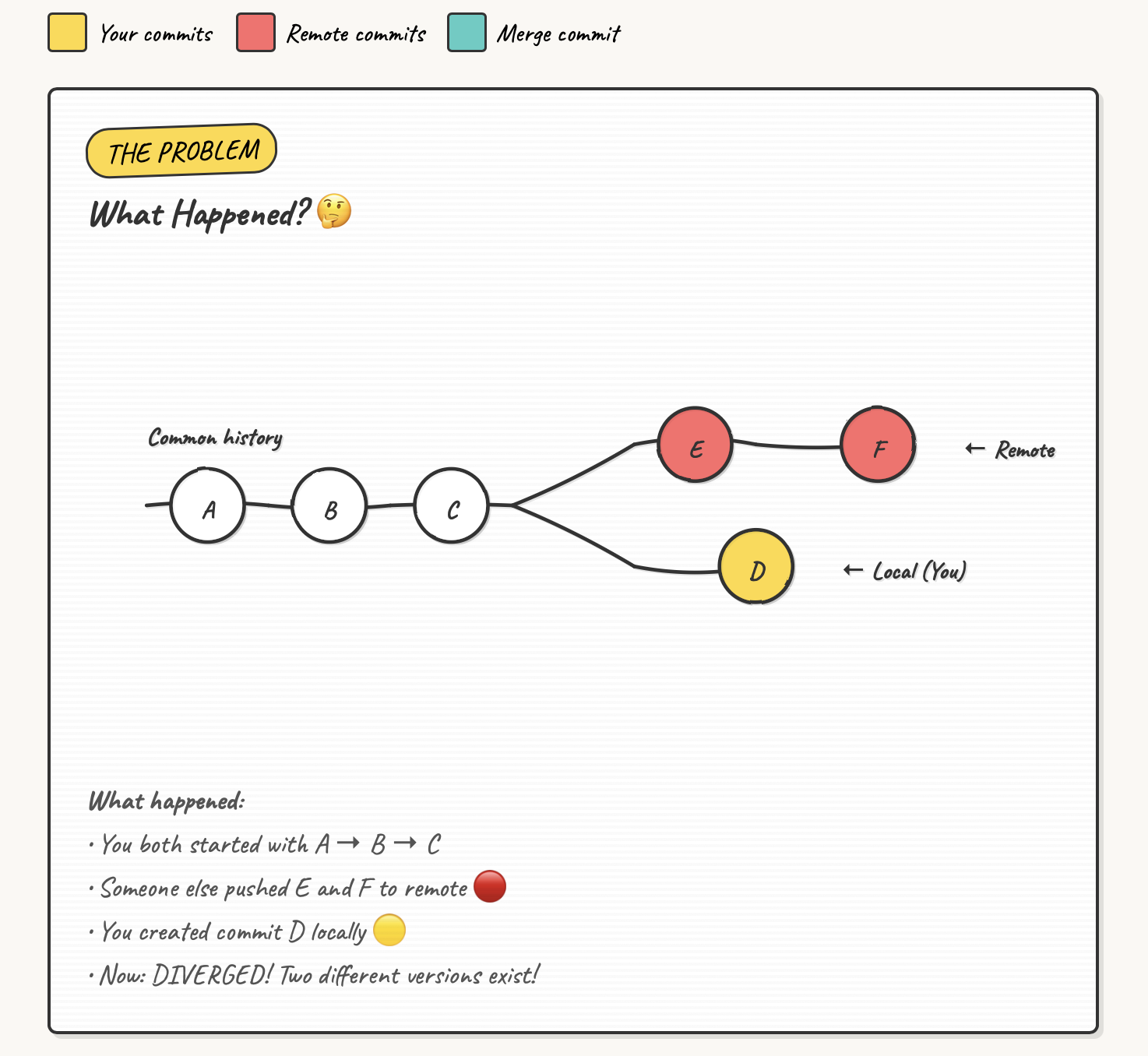
Breaking Down the Diagram
- Commits A, B, C: Shared history between local and remote
- Commit C: Where the branches diverged (common ancestor)
- Commits E, F (red): Changes pushed to remote while you worked locally
- Commit D (yellow): Your local commit that hasn't been pushed
Git doesn't know which version is "correct"—both have valid work!
Common Causes
You and a teammate both work on feature/auth. They push first. When you try to push, your branches have diverged.
You push from your work laptop, then commit from home (forgetting to pull first). Divergence!
Your pipeline makes automated commits (version bumps, lockfiles) while you're coding locally.
Someone force-pushed to the branch, rewriting history. Your local branch is now out of sync.
Three Solutions
Git offers three ways to reconcile divergent branches. Let's explore when to use each.
1. Merge Strategy
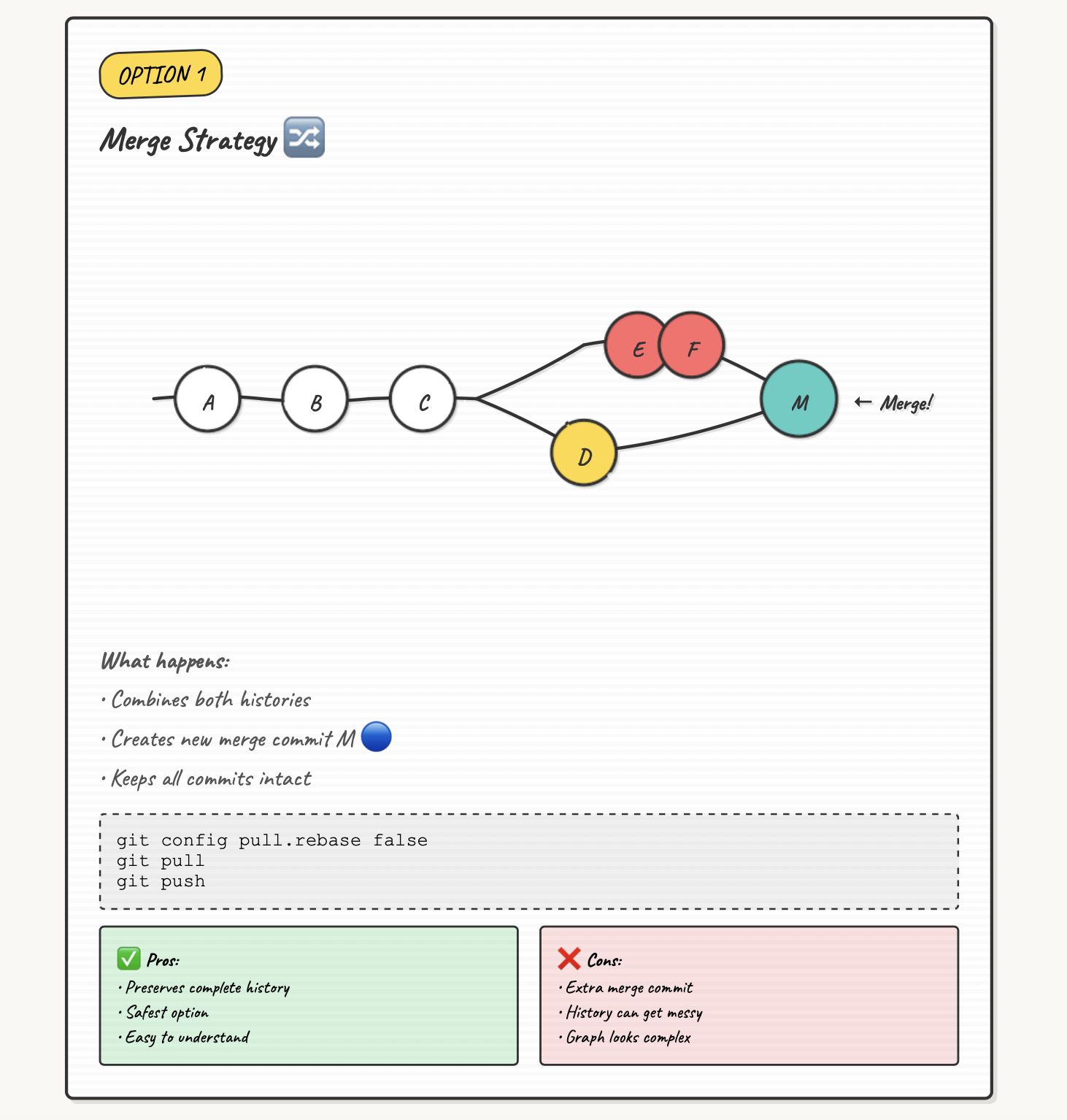
Creates a new "merge commit" with two parents, preserving both histories.
When to Use Merge
Best for: Main/shared branches where you want full transparency
Example: Working on main with your team. You want to see exactly when features were integrated.
Merge Advantages
- Preserves complete history
- Shows when branches were integrated
- Non-destructive (doesn't rewrite history)
- Good for collaborative branches
2. Rebase Strategy ⭐ Recommended
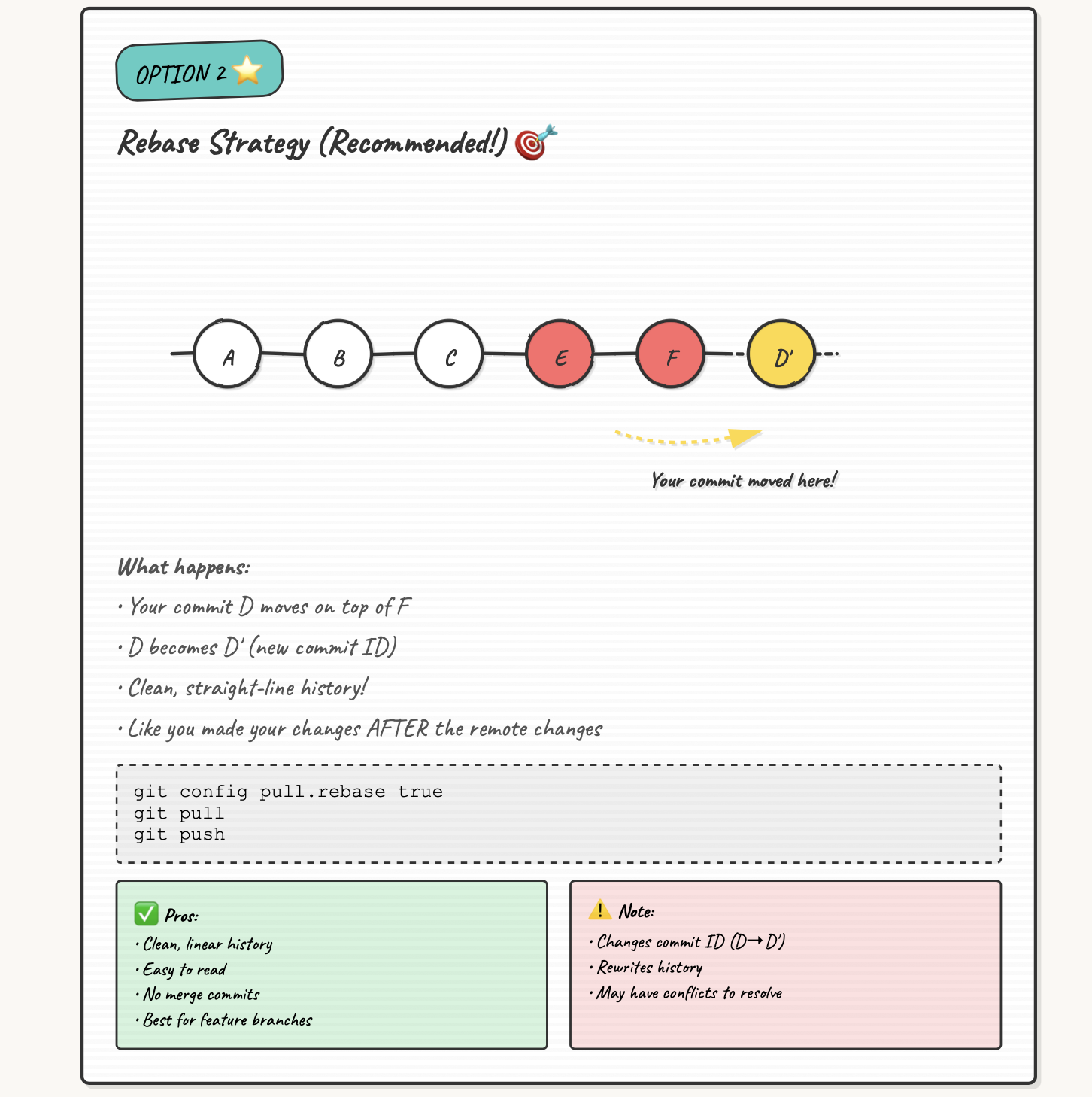
Replays your commits on top of the latest remote commits, creating a linear history.
When to Use Rebase
Best for: Feature branches where you're the primary developer
Example: Working solo on feature/login. You want clean, linear history.
Rebase Advantages
- Clean, linear history
- Easier to understand commit flow
- No extra merge commits cluttering history
- Perfect for feature branches
Golden Rule of Rebase
Never rebase commits that you've already pushed to a shared branch where others might have based work on them. Only rebase local commits or personal feature branches.
3. Fast-Forward Only
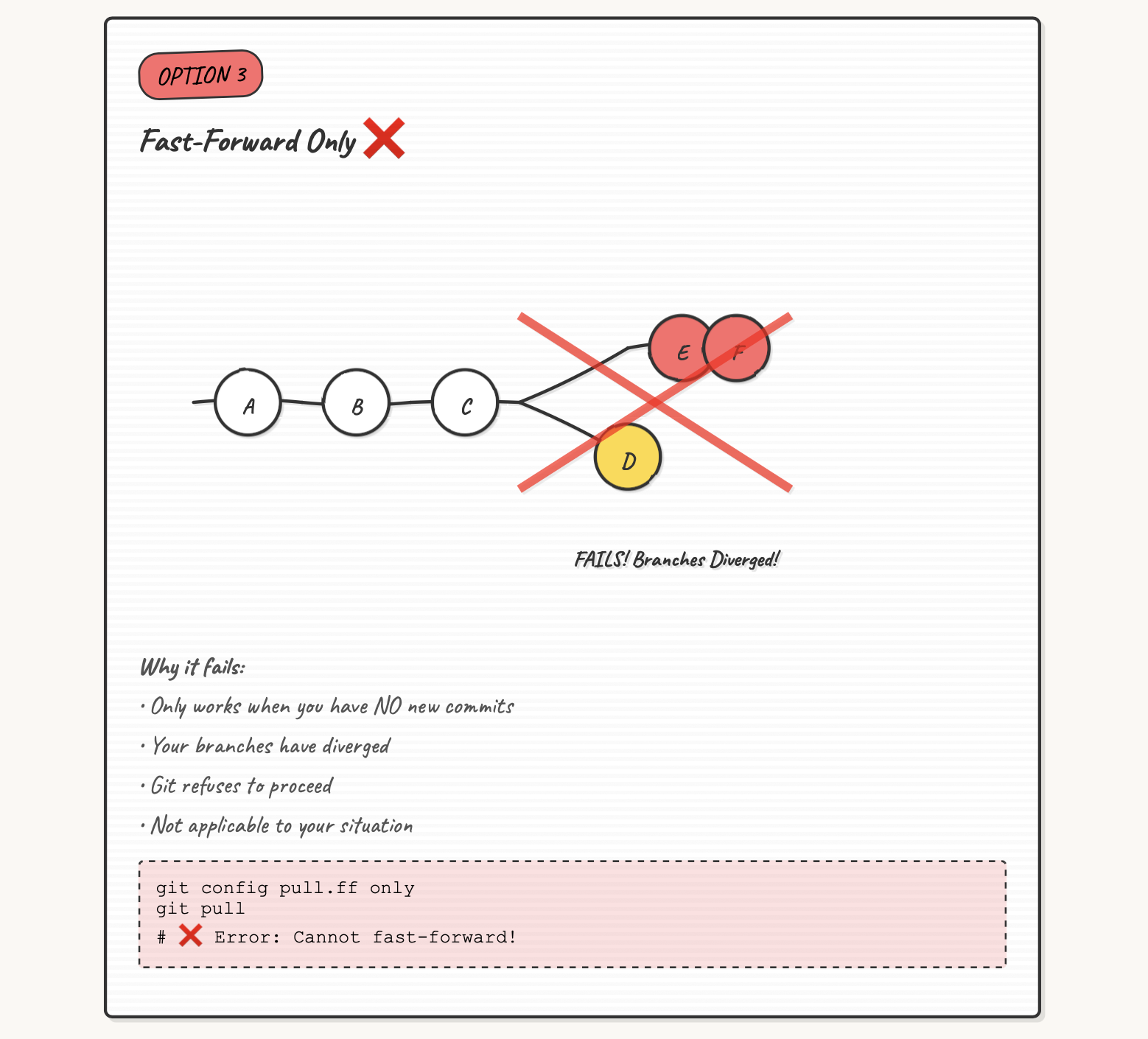
Only updates if your local branch is simply "behind" (no local commits).
When to Use Fast-Forward
Best for: When you want to be extra cautious and avoid automatic merges
Example: You cloned a repo and haven't made changes. Just want to update.
Why It Often Fails
Fast-forward only works when:
- Remote has new commits
- You have NO new local commits
In our divergent branch scenario, you HAVE local commits (Commit D), so this fails with:
Solving the Problem: Step-by-Step
Let's fix the divergent branch issue from our example.
Quick Solution (Feature Branch)
For a personal feature branch, rebase is cleanest:
# 1. Set rebase as the strategy
git config pull.rebase true

# 2. Pull with rebase
git pull

# 3. Push your changes
git push
Done!
Your commits are now replayed on top of the remote changes. Clean, linear history!
Handling Merge Conflicts
Sometimes your changes and remote changes touch the same lines:
$ git pull
Auto-merging myfile.py
CONFLICT (content): Merge conflict in myfile.py
error: could not apply 396de08... changes
Resolve all conflicts manually, mark them as resolved with
"git add/rm <conflicted_files>", then run "git rebase --continue".
Conflict Resolution Steps
1. Open the conflicting file(s)
Git marks conflicts with special markers:
<<<<<<< HEAD
# Remote version (what's on GitHub)
print("Hello from remote")
=======
# Your version (your local commit)
print("Hello from local")
>>>>>>> 396de08 (changes)
2. Edit to resolve the conflict
3. Stage the resolved file
4. Continue the rebase
5. Push your changes
Need to Abort?
If things go wrong during conflict resolution:
Best Practices
Minimize divergent branches with these habits:
Always Pull Before Pushing
Set a Default Strategy
Choose your preferred method globally:
Additional Tips
Team Coordination
- Communicate when working on the same branch
- Use separate feature branches per developer
- Consider branch protection rules
Commit Frequently
- Don't let your local branch get too far ahead
- Smaller, frequent pushes reduce conflict chances
- Push daily (or more often)
Use Pull Requests
For main/shared branches, use PRs instead of direct pushes. This prevents accidental divergence.
Quick Reference
| Strategy | Command | Best For | Result |
|---|---|---|---|
| Rebase | git pull --rebase |
Feature branches, solo work | Linear history |
| Merge | git pull --no-rebase |
Shared branches, teams | Preserves full history |
| FF Only | git pull --ff-only |
Safe updates, no local commits | Simple updates only |
Common Commands
# Set default strategy
git config pull.rebase true   # or false, or ff-only

# Pull with specific strategy (one-time)
git pull --rebase
git pull --no-rebase
git pull --ff-only

# During conflict resolution
git rebase --continue   # After resolving conflicts
git rebase --abort      # Undo the rebase
git rebase --skip       # Skip current commit

# View branch status
git status
git log --oneline --graph --all
Key Takeaways
Remember
- Divergent branches are normal—they happen when local and remote histories differ
- Three solutions: Merge, Rebase, or Fast-Forward (when possible)
- For feature branches: Use rebase for clean, linear history
- For shared branches: Use merge to preserve complete history
- Always pull before pushing to minimize divergence
Real-World Solution
For the scenario we started with:
Clean history maintained, changes successfully pushed!